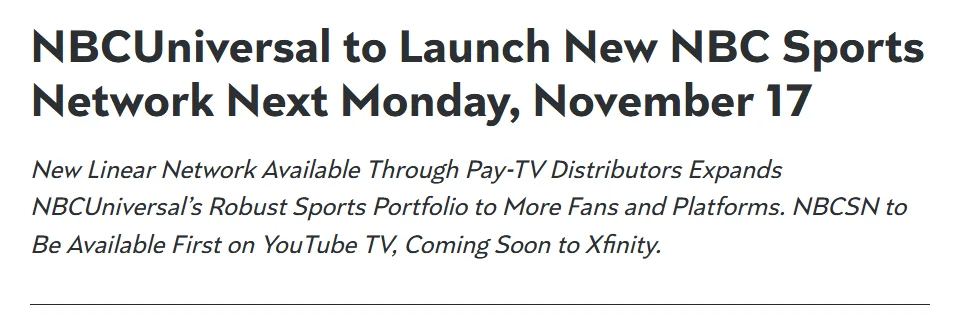
NBCSN returned on 17 November 2025 as a new NBC Sports Network, and Premier League matches are part of its programming. For US viewers, the useful question is now whether your provider offers the correct NBCSN feed for the particular match you want. An old article saying NBCSN no longer exists cannot settle that question.
This guide explains how to find the channel, distinguish it from NBC, USA Network and Peacock, and check simultaneous games without assuming one subscription unlocks everything. Availability depends on the current distributor, plan and match assignment. Start with the fixture, then confirm the viewing route; the network’s name alone is not an all-season streaming pass.
NBCSN returned in 2025: why old viewing advice can be wrong
Two different eras explain the apparently contradictory search results. The earlier NBCSN ended on 31 December 2021. NBCUniversal later announced a new channel using the familiar initials, with its launch dated to 17 November 2025. The company’s new-network announcement is the relevant starting point when an older viewing guide describes the channel as permanently unavailable. History explains why that guide once made sense; the newer service means its conclusion needs updating.
The replacement is a linear sports network: it has a running programme schedule, rather than functioning only as a library of individual football streams. Its announced portfolio includes Premier League soccer alongside other sports. That matters when you open the channel and see something other than the match you expected. The existence of a sports channel does not mean it shows football all day, carries every Premier League fixture, or makes an unassigned match available by default. Always compare the actual programme with the match listing.
Update your viewing routine as well as your bookmarks. An old channel number, a saved search for the former service or instructions written for a previous television package may point you in the wrong direction. Search your current provider’s guide for the full NBC Sports Network name and the match’s club names. Check the guide’s date and whether the item is live, upcoming or a repeat. If you no longer use the provider mentioned in an old article, that article cannot establish access under your present subscription. The next step is to inspect the account you actually watch through.
Where to check access to the new NBC Sports Network
Start with the television service you already pay for. NBCUniversal’s November 2025 announcement named YouTube TV as the first launch distributor and described Xfinity as coming later. Those statements explain the rollout, but a launch announcement is not a complete directory of providers in October 2026. Your current provider’s network list, account details and live programme guide are the useful checks now. Search for NBC Sports Network as well as NBCSN, because a guide can display the expanded name. Finding NBC alone does not answer this question.
For YouTube TV, the provider’s network availability guidance is a better starting point than an old channel-number article. Check the location and membership associated with the account you intend to use. Then look for the channel and the actual match programme inside that account. A network advertised somewhere on a provider’s website is not enough to settle every question about your own plan or location. If the programme does not appear, resolve that discrepancy before kickoff rather than treating a search-engine preview as confirmation.
If you are considering a new subscription, work backwards from the fixture. Write down the exact match, broadcaster and kickoff time, then compare those details with the proposed service’s current offering. Read its price, renewal and cancellation information in the purchase flow. A service that solves one NBCSN assignment may not solve a different Peacock-only assignment on another weekend. This is why buying first and checking the schedule afterwards is an unreliable method. For an occasional viewer, the relevant comparison is the cost of getting the games you actually intend to watch, not how many sports logos appear on a promotional page.
YouTube TV and ordinary YouTube are different products
YouTube TV is the television subscription product with a live network guide. The public NBC Sports YouTube channel is a different destination. Using a Google account to open ordinary YouTube does not, by itself, demonstrate that you hold the television subscription needed for an NBCSN programme. The similar names can obscure this distinction, especially when a search for a match produces results from both products. Check which product you are opening before drawing a conclusion about access.
Imagine searching for two clubs and seeing a video with both names in its title. That title can describe highlights, a preview or an interview just as easily as a live fixture. Inspect the format and publication time. An edited recap of a completed game is not the forthcoming ninety-minute broadcast, even if its title closely matches your search. In YouTube TV, use the programme listing and live guide to identify the scheduled event. In public YouTube results, a familiar broadcaster logo alone cannot establish that the full live game is available.
Official videos remain useful when you want analysis or a recap after a match. They can also help you follow a club between games. Keep that purpose separate from verifying a live television feed. If an authorized public live broadcast is specifically announced for an event, check that announcement and the exact event it names. Do not turn the existence of a broadcaster’s public channel into a standing promise that every Premier League match streams there for free.
NBCSN, NBC, USA Network and Peacock do different jobs
Read a broadcaster label as a destination for the particular event, rather than as an interchangeable sports brand. NBCUniversal’s 2026/27 opening-weekend announcement lists NBC, NBCSN, USA Network and Peacock in different combinations. A fixture search therefore needs more precision than “NBC has the Premier League.” The useful question is which listed route works with your own account for this game. The comparison below turns those labels into checks you can make before opening a stream.
| Label on the listing | Check before kickoff |
|---|---|
| NBCSN / NBC Sports Network | Find the exact programme in your television provider’s live guide. |
| NBC | Match the listing to the NBC programme available through your viewing route. |
| USA Network | Find USA’s programme rather than assuming NBCSN carries the same match. |
| Peacock | Open the match event in your Peacock account and check its live status. |
| NBC Sports app | Check authorization for the intended event; installing an app alone does not settle access. |
Peacock’s Premier League hub describes selected live matches. Treat that word seriously: a Peacock subscription is not a promise that every league fixture is live there. Likewise, a free download is a delivery mechanism, not evidence that an account includes a particular paid broadcast. If an app offers clips when you expected the match, check the fixture assignment and authorization rather than repeatedly opening the same generic homepage. The correct event may be in another listed product.
NBC Sports NOW is a separate free channel with sports talk and highlights. It is not NBCSN. The naming difference is small enough to miss when typing a search, but large enough to change what appears on your screen. Compare the complete name of the result with the match listing. A channel playing football discussion can be relevant to your interests while still being the wrong destination for the live fixture you selected.
When a listing names two platforms, identify a route that you actually hold rather than subscribing to both automatically. When it names only one, avoid assuming a second service will mirror it because the services share presenters or graphics. That discipline is especially useful when following one club across several weekends: the club remains the same, while the broadcast assignment can change. Keep the fixture and its access route together in your notes so that yesterday’s successful setup does not become tomorrow’s mistaken assumption.
How to find the correct NBCSN Premier League match
This guide concerns United States viewing. The Premier League’s territorial rights list names NBC Sports for the US during the 2025/26–2027/28 cycle. That does not make a US channel listing applicable in another country. Start with the clubs and competition you want, then select the appropriate viewing market. A search for a club’s next match can also return a cup fixture, so confirm that the event is Premier League football before applying this guide.
Use the Premier League TV schedule to organize the search by club, broadcaster and timezone, then confirm the event with the broadcaster and your provider. Choose one timezone for the comparison and write it beside the time. Do not compare a UK fixture card with an unlabeled American programme time. The league warns that broadcast selections and other competitions can change fixtures, so a calendar saved earlier in the season should be checked again. A broadcast’s programme start can also precede the actual kickoff; distinguish the two when setting your reminder.
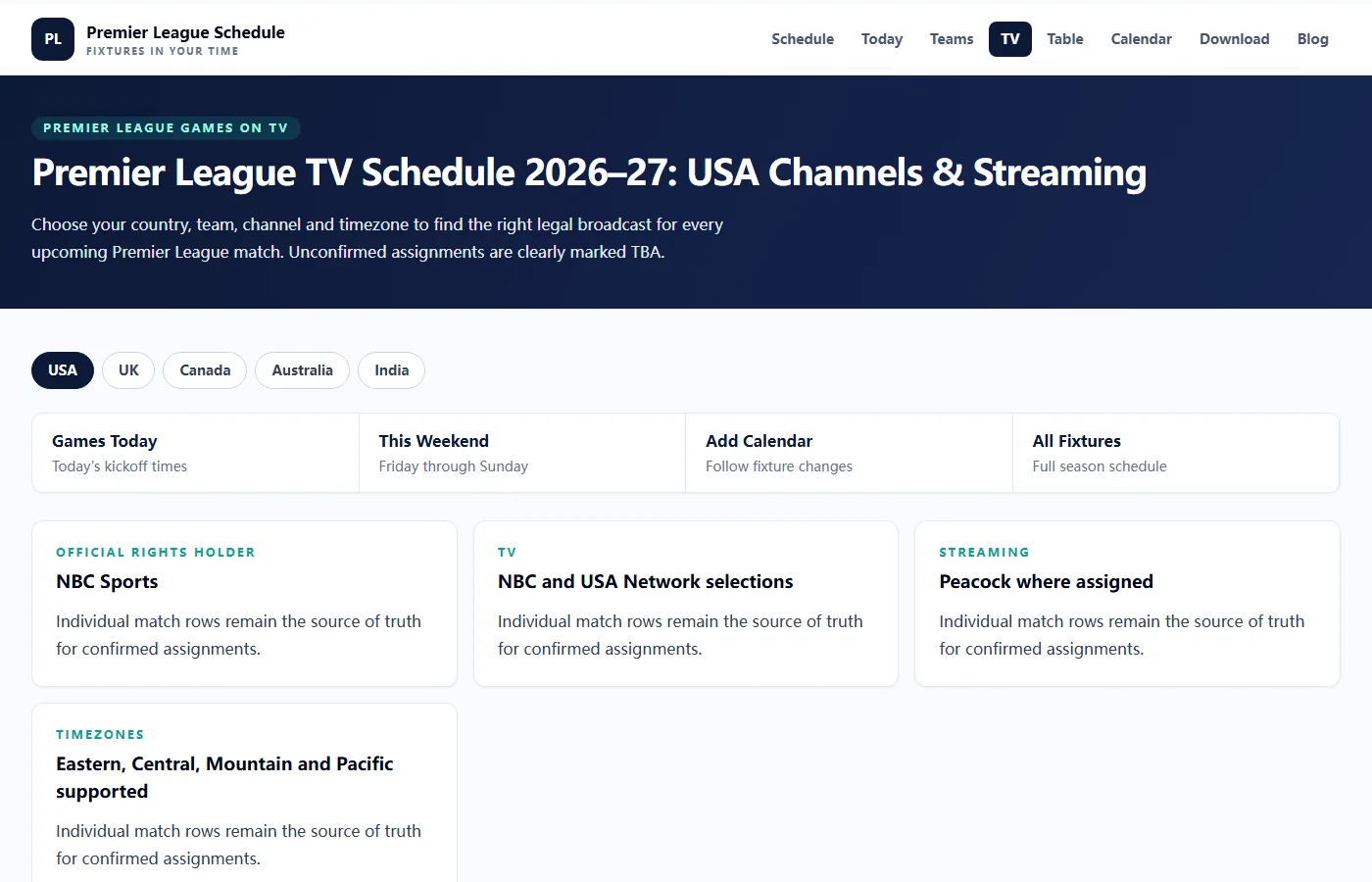
- Identify both clubs, the Premier League season and the current fixture date.
- Read the match-level broadcaster assignment rather than a generic rights-holder card.
- Keep an unconfirmed TBA assignment open for checking; it does not establish an NBCSN broadcast.
- Find the same event inside your provider’s guide, using matching dates and a clearly labeled timezone.
- Open the intended event and confirm its teams, competition and live or upcoming status before relying on it.
If two listings disagree, compare their update dates and the latest specific broadcaster announcement. A season-wide article can be correct about rights while remaining too broad to settle a particular Saturday assignment. Our schedule’s general NBC and USA cards are also summaries; use the actual event information and current primary listing for NBCSN. If your selected match still does not appear in the provider’s guide, contact that provider with the exact fixture details. Searching only “Premier League today” again usually reproduces the same broad results instead of resolving the missing event.
Simultaneous matches can require different feeds
Two fixtures can share a kickoff time without sharing a single watchable feed. The archived 2026/27 opening-weekend table below includes concurrent NBCSN entries and a footnote limiting one to select subscribers. That qualification is the lesson to carry forward, rather than a promise about your next match. When a service name appears beside several games, check the programme title and any access notes for the individual fixture. A familiar channel name does not, on its own, establish that your account can open every listed event.
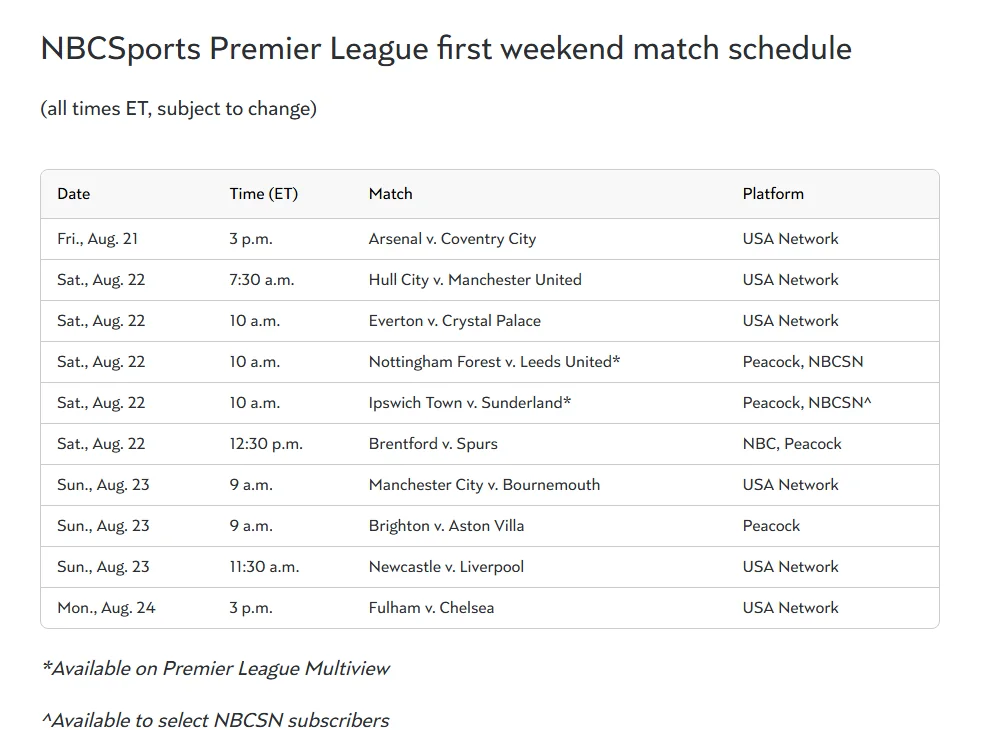
Search inside the provider for the clubs as well as the network. YouTube TV’s viewing help explains that people who customized their Live tab may need to add new networks to that customized lineup. A missing tile therefore deserves investigation before you conclude that a feed is unavailable. Search the event, inspect the full guide and compare the results with your account’s current lineup. This is a troubleshooting step, not evidence that every subscriber receives every extra channel or concurrent match.
Make the final check on the actual programme screen. If the teams on screen differ from your chosen fixture, confirm whether you selected a studio programme, another simultaneous match or a repeat. Keep the original broadcaster listing handy so you can identify the intended event precisely when requesting help. Avoid guessing an extra channel number from another viewer’s setup: even a correct instruction for their service does not establish the same display or access on yours. Exact event names are more useful than assumptions about how a provider labels overflow coverage.
Prepare your account, screen and replay plan before kickoff
Test the screen you intend to watch on before the programme begins. Sign in, find the event and check that playback works through your chosen authorized route. A successful search on a phone does not establish that a different television is signed into the same account or has the right application ready. This is practical preparation rather than a guarantee about any device model. Leave time to correct a password problem, update an app or ask the provider about an access message without losing the opening minutes while you troubleshoot.
Travel changes the preparation. YouTube TV’s travel guidance says programmes can vary when you travel within the US and that programmes cannot be accessed during international travel. Peacock’s region notice also requires US customers to be physically in the US to stream. Check the service’s location guidance before assuming your usual home setup will work elsewhere. If a trip takes you outside the applicable territory, consult the authorized broadcaster for that destination. A saved match bookmark does not remove geographic conditions attached to the service.
If you plan to watch later through YouTube TV, use its recording instructions before the event starts. The provider says adding a programme while it is already in progress starts the recording at that point; some sporting events can also have restrictions. Confirm the correct team or event has been added to your Library and inspect the scheduled airing. This is a different task from merely remembering which channel shows the game. If missing kickoff would spoil your plan, do the recording check the previous evening rather than during the first half.
A service’s on-demand replay is different again. Peacock’s published qualification covers matches streamed live on Peacock and NBC, with replay availability shortly after the livestream ends. Do not extend that statement into a guarantee that every NBCSN or USA game will appear there, or impose a fixed delay copied from an older season. Find the exact match replay and distinguish it from highlights if you want the complete game. By kickoff, your preparation should end with a specific working event, a clear viewing time and an independently checked later-viewing option if you need one.
Comments
Ask a useful question or share a helpful tip. Comments are reviewed before publication.
Loading comments…